

PriceLabs Airbnb hosts use PriceLabs to set their nightly price automatically: it connects to your Airbnb listing and sends a fresh price every night. It also shows what similar listings charge and earn. What it doesn’t show is what you keep after Airbnb’s fee and your running costs, and that’s the number that decides whether a deal works.
I’ve coached more than 500 newcomers into short-term rentals and set most of them up on PriceLabs. This is the guide I wish they’d all had on day one.
What PriceLabs does for an Airbnb host
- Dynamic Pricing: sets a different price for every night based on demand, season, day of the week and how far ahead the date is, then syncs it to Airbnb.
- Market Dashboard: shows what comparable listings in your area charge, how booked they are and how prices move through the year.
- Revenue Estimator: estimates what a property could earn before you take it on, with a nightly rate (ADR), occupancy and monthly seasonality.
All three answer one question: how much revenue? That’s essential, and it’s only half the picture.
Before you connect: 4 checks
- Turn off Smart Pricing on Airbnb, as it conflicts with PriceLabs.
- If you use a property management system or channel manager, connect PriceLabs through that instead of directly.
- Your listing must be live and bookable. Snoozed or brand-new listings with no availability can’t be imported.
- Co-hosts need Full Access permission on the listing.
How to connect PriceLabs to Airbnb (6 steps)
Add your listings
Log in to PriceLabs and click Add Listings from Airbnb on the welcome screen — this auto-connects straight through Airbnb's own login, no menu-digging needed.
Adding more listings later?
If you're coming back to add further listings, go to Add/Re-import Listings and choose Airbnb/Booking.com/Vrbo/Houfy (not PMS/Channel Manager), then select Airbnb.
Connect with Airbnb
Either route takes you to Airbnb's own login — approve the connection with Allow.
Check your listings imported
Your Airbnb listings should now appear in your PriceLabs dashboard.
Set your price limits
Review the base, minimum and maximum price for each listing before anything syncs.
Switch on Sync Prices
PriceLabs then sends a price update every night (GMT), or press Sync Now to push one straight away. Check your Airbnb calendar to confirm the new prices have landed.
Beyond PriceLabs revenue: your net profit
Here’s a worked example for a 2-bed. These are illustrative figures, not a real property.
| Nightly rate (ADR) £150 × 21 nights (70% occupancy) | £3,150 revenue |
| Airbnb host fee (15.5%) | −£488 |
| Rent | −£1,400 |
| Bills (energy, water, broadband) | −£250 |
| Cleaning and laundry (7 turnovers × £75) | −£525 |
| Council tax / business rates | −£150 |
| Supplies and toiletries | −£60 |
| Buildings and contents insurance | −£64 |
| Subscriptions & software | included |
| Net profit | £197 |
The revenue looks healthy. The profit is under 7% of it. And that’s an average month: in a quiet winter month the same property can lose money, which a single yearly average hides (see the average ADR trap).
From PriceLabs revenue to net profit, in one click
The free Prop AnalytiX Analysis Extension reads the PriceLabs page you already have open and pulls the ADR, occupancy and all 12 months of seasonality into the Prop AnalytiX Calculator. You add your costs (the AI Expense Assistant estimates them for your postcode), and the Calculator shows your profit month by month, your ROI, and a PDF you can share with a landlord or investor.
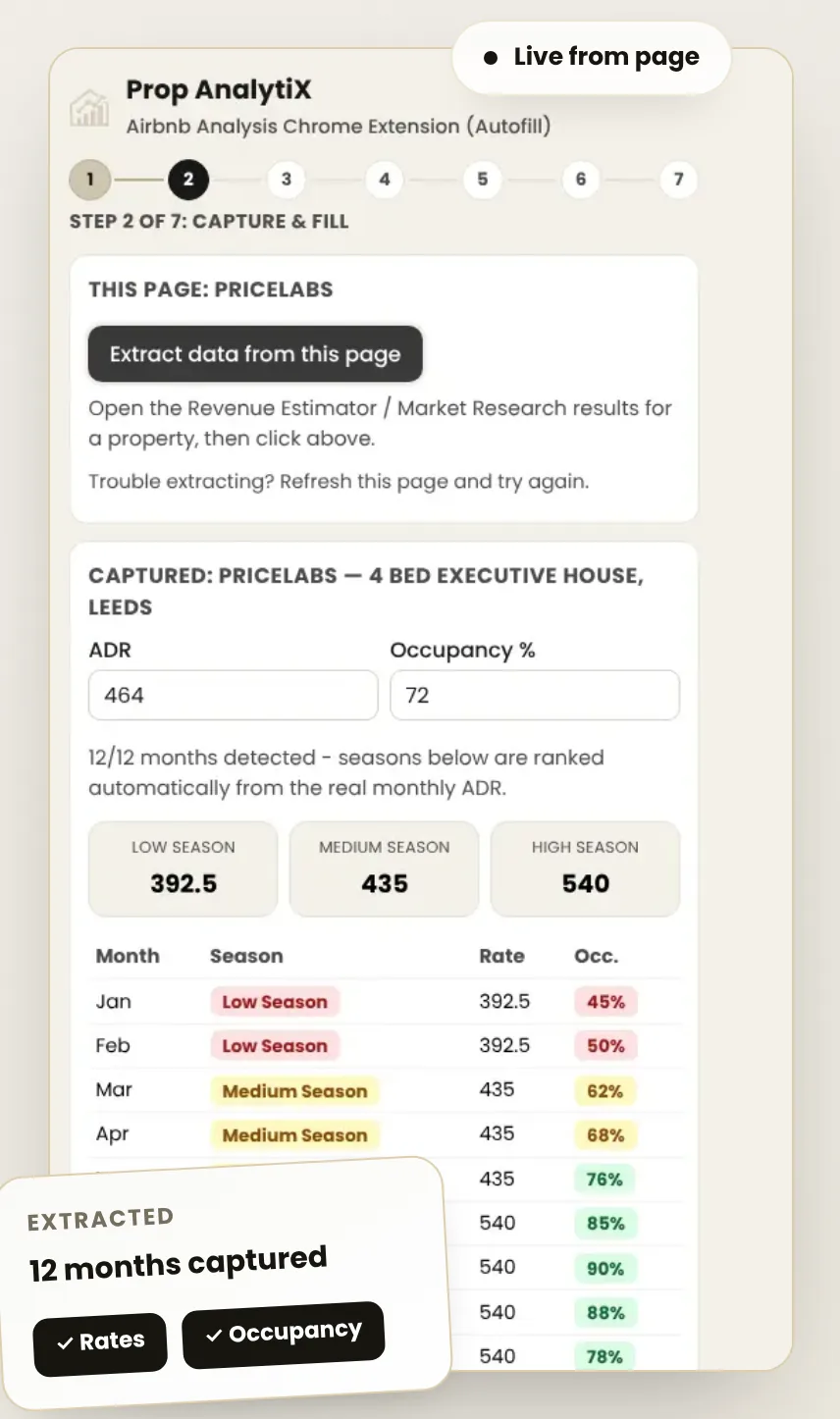
Step by step: how to turn a PriceLabs Revenue Estimator report into a net profit forecast. See Calculator pricing.
FAQs
Does PriceLabs work with Airbnb directly?
Yes. PriceLabs has an official Airbnb integration. If you use a property management system or channel manager, connect PriceLabs through that instead.
How often does PriceLabs update Airbnb prices?
Once Sync Prices is switched on for a listing, PriceLabs sends a price update every night (GMT). You can also push an update at any time with Sync Now.
Should I turn off Airbnb Smart Pricing?
Yes. Smart Pricing and PriceLabs will overwrite each other, so switch Smart Pricing off before you connect.
How does PriceLabs charge?
After the free trial, PriceLabs charges for each listing it pushes prices to during a billing cycle. Check PriceLabs’ own pricing page for current rates.
Is Prop AnalytiX part of PriceLabs?
No. Prop AnalytiX is independent and not affiliated with PriceLabs. The Analysis Extension simply reads the PriceLabs page you’re logged into, in your own browser.
Independent tutorial. Prop AnalytiX is not affiliated with or endorsed by PriceLabs. Figures are estimates for illustration, not financial advice. Your results will vary.
See the profit behind your PriceLabs numbers
Add the free extension and go from revenue to net profit in minutes.
No payment required · takes under 2 minutes to set up